What Is Claude Tag? Anthropic's Always-On AI Teammate in Slack
Claude Tag is a new Anthropic feature (launched June 23, 2026) that adds Claude to your Slack channels as a shared, always-on teammate. Anyone can type @Claude in a thread to hand off work, and it runs under one org-level identity. It replaces the old Claude in Slack app, retiring August 3, 2026.
Beta · Claude Team & Enterprise plans · Works in Slack today.
Old Claude in Slack retires in
August 3, 2026
Launch credits expire in
September 1, 2026
Dates per Anthropic press coverage — confirm in your Claude admin console.
Are you affected by the August 3 change?
If your team already uses the old Claude in Slack app, this change affects you. Answer three quick questions and we'll tell you exactly what to do before the deadline — no sign-up, no data leaves your browser.
Your result
Tick the boxes that apply to your team and we'll tell you exactly what to do before August 3 — instantly, right here on this page.
Eligibility details are from press coverage and may change — verify in your Claude admin console.Media
What is Claude Tag?
Claude Tag is Anthropic's new agentic AI teammate designed specifically for Slack workspaces. Instead of acting as a private chatbot, Claude Tag operates as a shared, always-on AI assistant within your channels. An admin adds Claude Tag to selected channels, connects it to your company's tools, data, and codebases, and allows anyone to @mention Claude Tag to hand off complex tasks. Claude Tag then works through the task in the open Slack thread, providing full visibility to the entire team.
The biggest shift with Claude Tag is the move from personal identity to agentic identity. Previous integrations ran Claude under your individual Slack login. Claude Tag, however, gives the entire organization one shared AI agent that acts under a centralized, org-level identity. It uses the specific permissions an admin configures per channel, and all usage is billed centrally to the organization. This evolution transforms Claude from a 1:1 personal assistant into a highly capable, shared organizational resource with persistent memory and strict governance.
Because everyone in a Slack channel interacts with the same Claude Tag agent, a teammate can seamlessly pick up a task that someone else started. Claude Tag retains the full context of the thread and the project, ensuring that no one has to re-explain the situation or copy-paste previous instructions.
- Lives directly in Slack channels, not just in your private DMs — so work happens in the open
- Shared, agentic model — one org-level identity, centrally billed to the organization
- Delegated execution via @Claude — assign plain-language tasks that Claude Tag completes in visible stages
- Persistent memory — remembers context over time across all the channels it operates in
- Optional ambient mode — Claude Tag can act proactively and follow up without being explicitly tagged
See Claude Tag in action
Here's what actually happens when you tag @Claude in a Slack channel. Pick a scenario below and step through a simulated thread — the same way Claude Tag breaks a task into stages and posts its work back where your team can watch.
Simulated for illustration, based on Anthropic's published walkthrough. Not a real workspace.
What can @Claude actually do in Slack?
Claude Tag is best for work that already lives in Slack threads and benefits from being shared — summaries, status pulls, drafting, investigations, and handoffs. It breaks each task into stages, uses the tools an admin connected, and posts results back in the thread. Here's what teams are delegating first.
Also handles: pulling metrics from a connected database, summarizing analytics in plain English, routing IT requests, and chasing multi-day tasks to completion.
| Team | Hand it to @Claude | What you get back |
|---|---|---|
Engineering | "Compare latency vs this morning's deploy and fix it" | Staged investigation → reproduced bug → a pull request, opened by the Claude app |
Support / Ops | "Draft a reply from our help docs" / "Summarize this incident" | A ready-to-edit draft; a clean incident recap; ambient follow-ups on stale tickets |
Product / PM | "Turn this thread into a spec" / "Track the decisions" | A structured draft spec; a running decision log with owners |
Any team | "Pick up where Sam left off" | The task continues with full context — even after Sam logs off |
Engineering
Hand it to @Claude: "Compare latency vs this morning's deploy and fix it"
What you get back: Staged investigation → reproduced bug → a pull request, opened by the Claude app
Support / Ops
Hand it to @Claude: "Draft a reply from our help docs" / "Summarize this incident"
What you get back: A ready-to-edit draft; a clean incident recap; ambient follow-ups on stale tickets
Product / PM
Hand it to @Claude: "Turn this thread into a spec" / "Track the decisions"
What you get back: A structured draft spec; a running decision log with owners
Any team
Hand it to @Claude: "Pick up where Sam left off"
What you get back: The task continues with full context — even after Sam logs off
Claude Tag is strongest on summaries, status, drafting, and investigations — not deeply bespoke judgment calls. Treat its output as a draft and keep a human in the loop for anything irreversible (deploys, customer messages, data changes).
How is Claude Tag different from the old Claude in Slack app?
They're not the same. Claude Tag replaces the old Claude in Slack app on August 3, 2026. The old app ran under your personal login and billed to you; Claude Tag runs under a shared org identity, is governed per channel by an admin, and bills to the organization.
| Old "Claude in Slack" app | Claude Tag | |
|---|---|---|
Identity | Your personal user | Organization-level shared identity |
Who it acts as | You (your permissions) | Its own agent identity (own Slack/GitHub/warehouse accounts)Media |
Billing | The individual | The organization |
Access control | Per user's own connections | Admin-scoped, per channelMedia |
Context | Per session / personal | Persistent, shared across the team |
Proactivity | On-demand only | On-demand + optional ambient mode |
Status | Retiring Aug 3, 2026 | Live in beta (Team & Enterprise) |
How does the agent-identity model work?
Instead of borrowing one person's permissions, Claude Tag acts under a workspace-level identity, and an admin decides — per channel — which tools, data, and codebases that identity can reach. Claude gets its own accounts: it posts as the Claude app in Slack, opens pull requests as the Claude GitHub App, and queries data under its own service account.
Why it matters
A shared identity means a task doesn't break when the person who started it logs off or leaves — context, access, and ownership live with the channel and the organization, not one employee. That continuity is what makes handing half-finished work between people and Claude actually work. The trade-off: an admin has to configure each channel deliberately, instead of relying on everyone's personal connections.
What is ambient mode in Claude Tag?
By default Claude Tag is reactive — it only acts when you tag @Claude. Ambient mode is an opt-in setting that lets Claude jump in on its own: flagging relevant updates, following up on open threads, and chasing tasks that have gone quiet, without anyone asking.
On-demand (default)
- Acts only when tagged
- Predictable, low-noise
- Best for a new channel
- Easy to audit who triggered what
Ambient (opt-in)
- Acts proactively, untagged
- Flags cross-team updates
- Best once the team trusts it
- Tune per channel to avoid noise
Start on-demand. Turn on ambient only in channels where proactive nudges help (e.g. a busy incident channel) — not in quiet leadership channels where an agent volunteering opinions becomes noise.
Who can use Claude Tag, and is it free?
Claude Tag is in beta on Claude Team and Enterprise plans and works in Slack today. There's no separate price tag — it's included with those plans, and usage is billed to your organization. Anthropic is handing out launch credits to eligible teams to offset early usage, but they expire soon.
Launch credits — the facts
| Plan | Amount | Who | Expires |
|---|---|---|---|
| Enterprise | $25,000in credits | 10+ seats | Sep 1, 2026 |
| Team | $2,500in credits | 10+ seats | Sep 1, 2026 |
Credits apply to Claude Tag usage in Slack (not personal DMs). Amounts and eligibility are from press coverage (last verified Jun 25, 2026) — confirm in your Claude admin console.Media
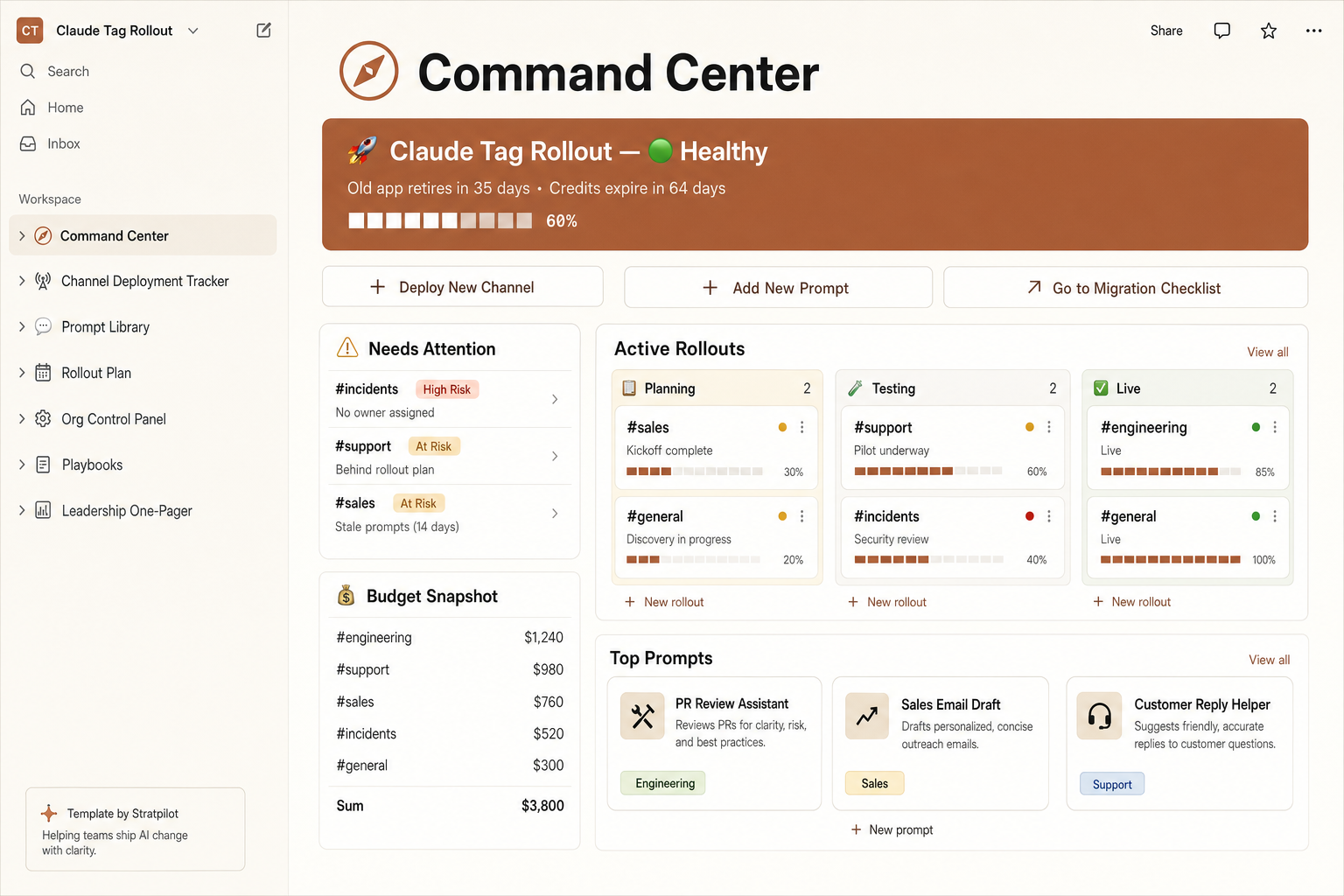
Run the whole rollout from one Notion page
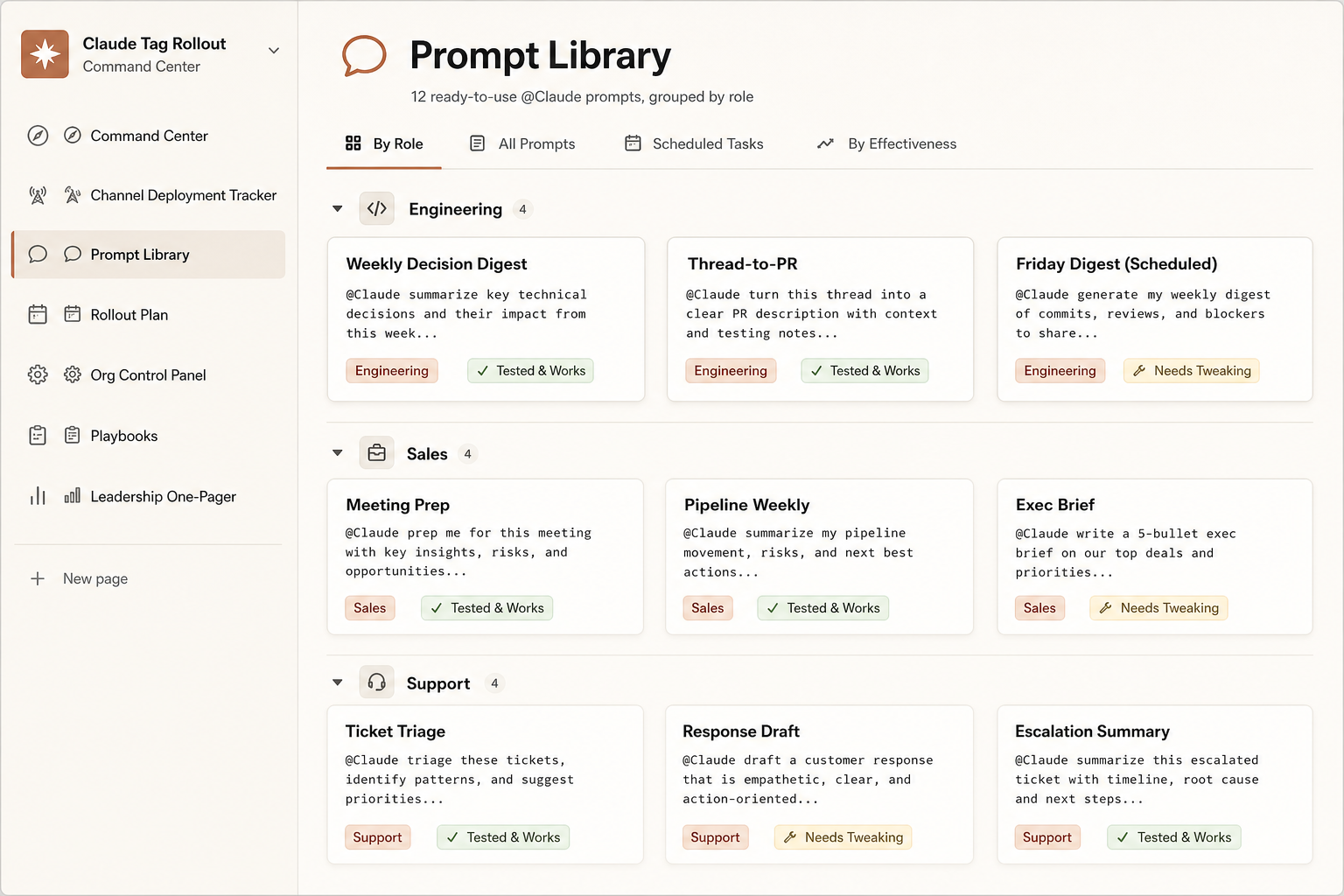
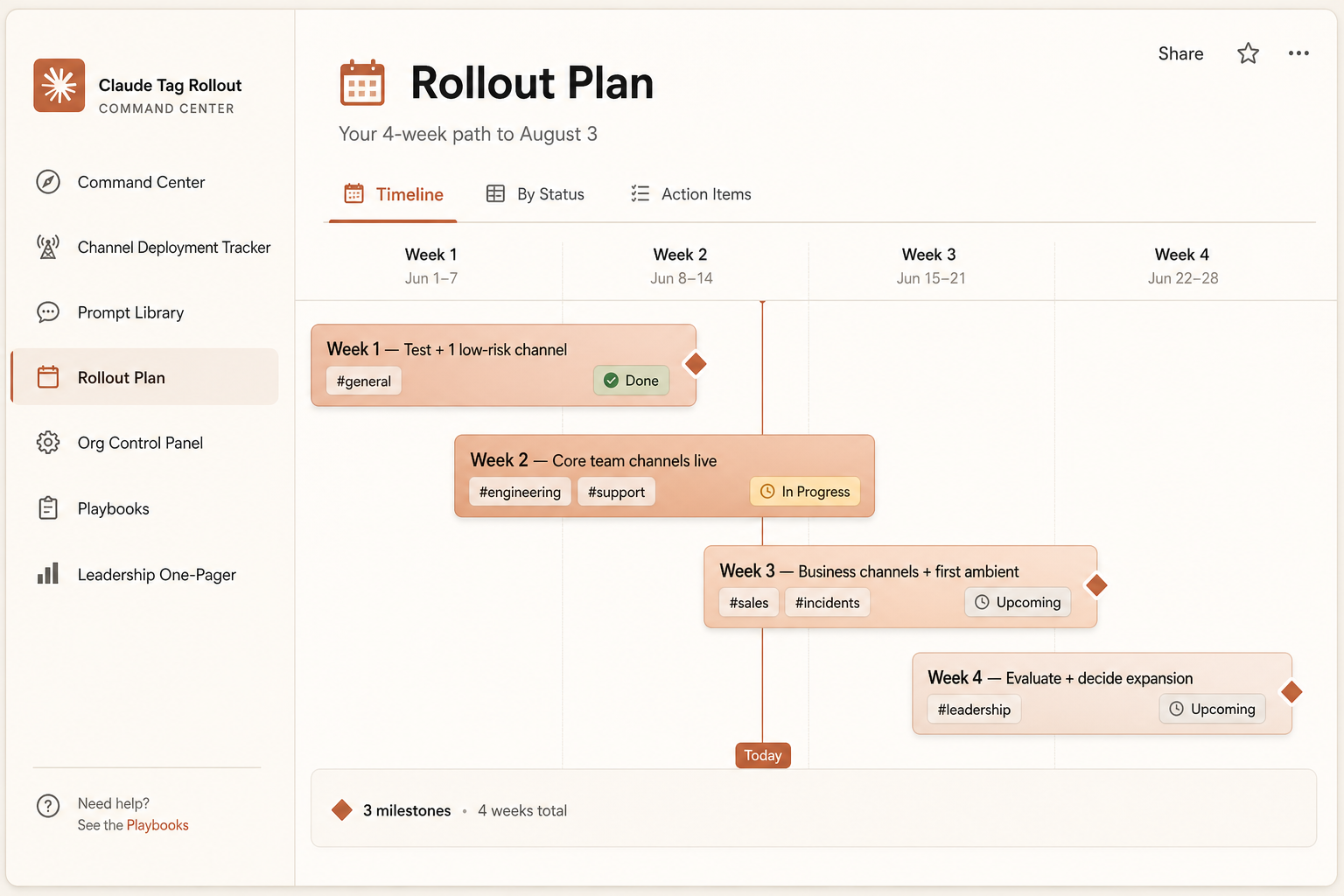
You've read the playbook — now run it. The Rollout Command Center turns every step on this page into a living Notion workspace: track each channel, watch your launch credits, plan the 4 weeks, and report to your boss — all pre-filled, ready the second you duplicate it.
Six connected databases already filled with sample data: a channel tracker with auto risk flags, a live credit runway, a 4-week plan, 12 ready @Claude prompts, and a boss-ready one-pager.
- Channel tracker with auto risk flags
- Live credits burn bar + runway
- 4-week rollout timeline
- 12 ready-to-use @Claude prompts
Launch price — save $12 (63% off) before Aug 3. One-time $7 · pre-filled · 14-day refund. Independent template, not affiliated with Anthropic.
Is Claude Tag safe to roll out?
It can be — but the security is only as good as how you scope it. Because Claude Tag reads channel history and can call connected tools, an admin should give each channel only the access its work needs, keep secrets out of agent channels, and require human sign-off for anything irreversible.
Before you add @Claude to a channel
- Scope per channel, not globally — a support channel doesn't need your deploy tools
- Mind channel history — Claude reads context, so watch channels holding secrets, PII, or credentials
- Treat connected repos as sensitive — confirm branch protections still apply to anything Claude opens
- Watch for prompt injection — untrusted messages in a channel can try to steer the agent
- Keep a human in the loop — deploys, data deletion, and customer-facing messages need explicit confirmation
On private channels: Claude Tag only reaches channels an admin adds it to — but once added, it reads that channel's history. Don't enable it (or ambient mode) in sensitive channels by default.
Is Claude Tag right for your team?
Claude Tag fits teams that already coordinate work in Slack and have repetitive, shareable tasks — summaries, drafting, status pulls, investigations. It's a weaker fit if your work rarely lives in Slack, or you're not on a Team/Enterprise plan yet.
Good fit if…
- Your team lives in Slack threads
- You want shared, visible AI work
- You're on Team / Enterprise
- You have repetitive, delegable tasks
Probably not yet if…
- Work mostly happens outside Slack
- You only need a private assistant
- You're on a lower tier (not supported yet)
- Every task is bespoke, high-judgment
Comparing it to native Slack AI or Claude Code? The short version: Slack AI summarizes; Claude Tag acts. Claude Code is for coding sessions; Claude Tag is the shared teammate in the channel.
How do you set up Claude Tag? (4 steps)
Setup takes four admin steps in your Claude organization console: pair it with Slack, connect the tools and data each channel needs, set organization spend limits, and test in a private channel before you roll it out widely.
Pair Claude with your Slack workspace
A Slack Owner/Primary Owner connects the workspace in the Claude admin console.
Connect tools, data & codebases — per channel
Give each channel only what its work needs.
Set organization spend limits
Cap usage so a busy channel can't run up a surprise bill.
Test in a private channel first
Try a few real tasks on-demand before enabling more channels or ambient mode.
Community / verify
Heads-up: third-party testers report setup requires a Slack Owner (not just an Admin) — verify against Anthropic's Help docs.
Claude Tag FAQ
What is Claude Tag?
Claude Tag is Anthropic's always-on Claude that lives in your Slack channels as a shared AI teammate. You tag @Claude in a thread to delegate work, and it acts under one organization identity using admin-scoped tools. It launched June 23, 2026 in beta for Team and Enterprise plans.
Is Claude Tag the same as Claude in Slack?
No. Claude Tag replaces the older Claude in Slack app. The old app acted under your personal login and billing; Claude Tag uses a shared org identity, per-channel admin controls, and bills to the organization.
When is the old Claude in Slack app going away?
The older integration retires on August 3, 2026. Admins of teams using it have a 30-day window to opt in to the migration. (Dates per press coverage — verify in your admin console.)
Who can use Claude Tag?
It's in beta on Claude Team and Enterprise plans and works in Slack today. Lower tiers don't have it yet. Anthropic says it plans to expand to other platforms over time.
Is Claude Tag free? How much does it cost?
There's no separate price — it's included with Team and Enterprise plans and billed to your organization by usage. Eligible teams (10+ seats) get launch credits: $2,500 (Team) or $25,000 (Enterprise), expiring September 1, 2026.
What can @Claude do in Slack?
Summarize long threads, pull metrics, draft replies, investigate bugs and open pull requests, turn discussions into specs, and follow up on tasks. It works in stages and posts results back in the thread. Output should be reviewed by a human.
What is agent identity?
Claude Tag acts under a workspace-level identity with its own connected accounts, instead of borrowing a person's permissions. Admins control what that identity can reach per channel, and usage bills to the organization.
What is ambient mode?
An opt-in setting that lets Claude act without being tagged — flagging updates and following up on open threads. With it off, Claude only responds when you tag @Claude. Start on-demand, enable ambient selectively.
Can Claude Tag read my private channels?
Only channels an admin adds it to. But once added, it reads that channel's history, so don't enable it in channels holding secrets, PII, or credentials by default.
Do I need to be a Slack Owner to set it up?
Third-party testers report setup requires a Slack Owner or Primary Owner, not just an Admin. Verify against Anthropic's official Help docs before you plan the rollout.
How do I migrate from Claude in Slack to Claude Tag?
An admin pairs the workspace, reconnects tools and channel access under Claude Tag, sets spend limits, and tests before August 3 so access and automations carry over without a gap.
Is this the official Claude Tag page?
No — this is an independent guide, not affiliated with Anthropic or Slack. For official details, see Anthropic's announcement and Help docs (linked in Sources below).
Don't miss the deadlines
Get one email before Aug 3 (old app retires) and Sep 1 (credits expire). No spam, unsubscribe anytime.
Sources & how we keep this accurate
This guide is maintained independently and updated as Anthropic ships changes. Every date, price, and capability above is sourced and dated; where details are still unconfirmed, we say so rather than guess. Last verified: June 25, 2026.
Primary sources
We are not affiliated with Anthropic. Prices and launch credits come from press coverage and may change — always confirm in your Claude admin console. Demo threads are simulated for illustration.